> ## Documentation Index
> Fetch the complete documentation index at: https://iam-docs.razi.ai/llms.txt
> Use this file to discover all available pages before exploring further.
# Google Integration
Only a super Admin user is allowed to proceed with this flow.
Make sure to either:
* Send a valid `Authorization` header with of type `Bearer TOKEN_VALUE` where **TOKEN\_VALUE** is the token generated for the super admin.
* In case your app supports cookie, you can enable request cookies as our API Automatically sets a cookie named `session-token` which is forwarded with each request to our api.
To add the Google Identity Provider to your application, you need to register your application with IAM server,
for this you need clientId and clientSecret of Google oauth application.
You can get the clientId and clientSecret from the [Google API
Console](https://console.developers.google.com/apis).
or follow these [steps](https://developers.google.com/identity/oauth2/web/guides/get-google-api-clientid)
```bash
curl --request POST \
--url http://localhost:3000/v1/authorization/idps/google \
--header 'Authorization: Bearer YOUR_SECRET_TOKEN' \
--header 'Content-Type: application/json' \
--header 'X-App-Name: ' \
--data '{
"clientId": "425512514548-plecdmi4lb18dvbsn6b5hve81o4ouvie.apps.googleusercontent.com",
"clientSecret": "GKCSPZ-cK6ukZSCVqUGCCvRSo8OEqOcys3b"
}'
```
Above call will return the id of the identity provider created along with the callback url.
```json
{
"message": "IDP activated successfully",
"id": "280259588811400351",
"callbackUrls": [
"https://dev-auth.iqraa.ai/idps/callback"
]
}
```
[Link to Playground](https://dev-iam.razi.ai/docs#tag/authorization/POST/v1/authorization/idps/google)
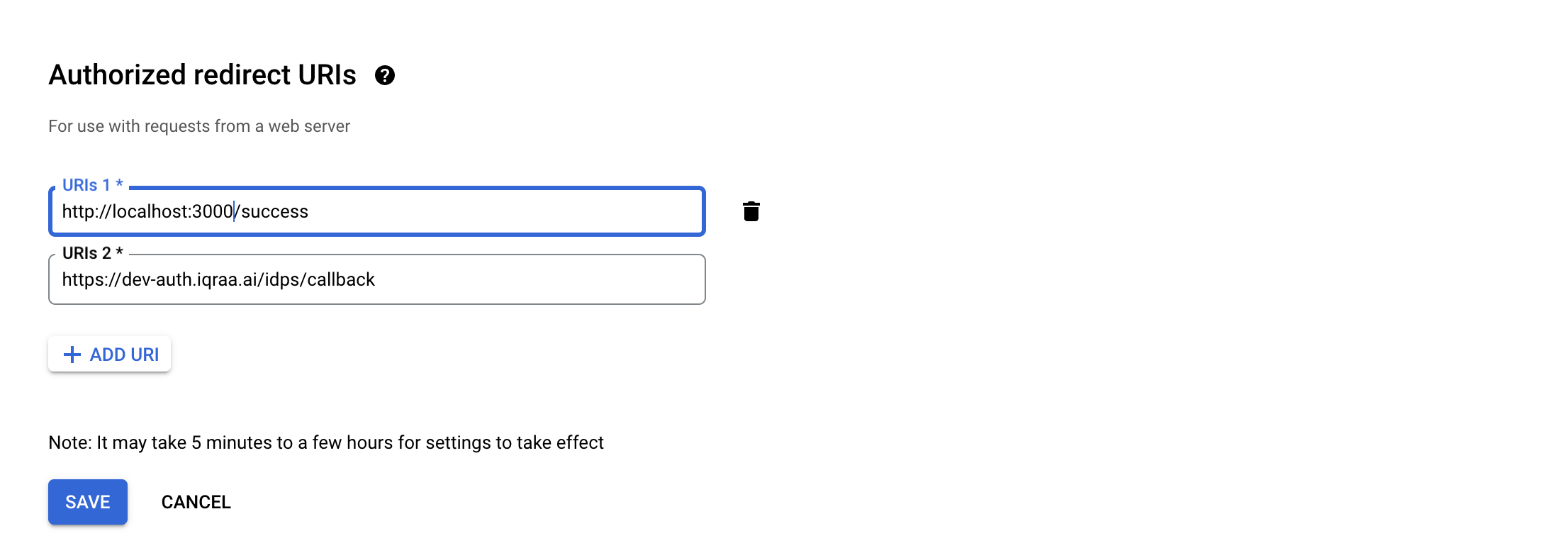
You can then use the above callback url and add it to `Authorized redirect uris` in the Google API Console.